
Elevators, escalators, moving walks.
From monitoring to safety.
NASEUL System connects it all: integrated monitoring and remote management, AI cameras, robot integration and escalator safety certification (PESSRAE).

Integrated with leading global elevator brands

Six elevator solutions,
one connected technology
From monitoring and safety certification to AI cameras, and robot integration. Our software is 100% developed in-house.
Unify equipment from different manufacturers on a single panel — real-time status, fault and control history, remote control and reset. Legacy panels are replaced with new Windows 11-based systems.
Instant remote access on fault reports — alarms, history, reports, part lifecycle.
A 7-inch LCD panel for small sites without a control room — lobby indicator and monitor in one.
AI analysis detects falls, violent movement, screams and more. 7,000+ delivered nationwide.
See the full details on the AI-based Products page. Go →
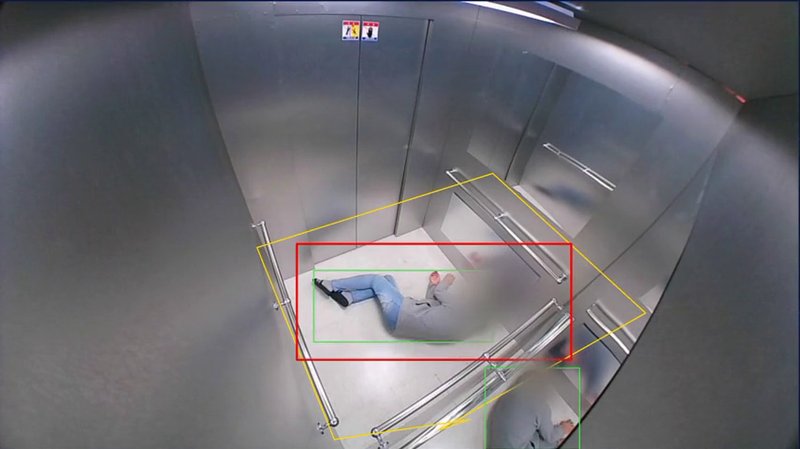
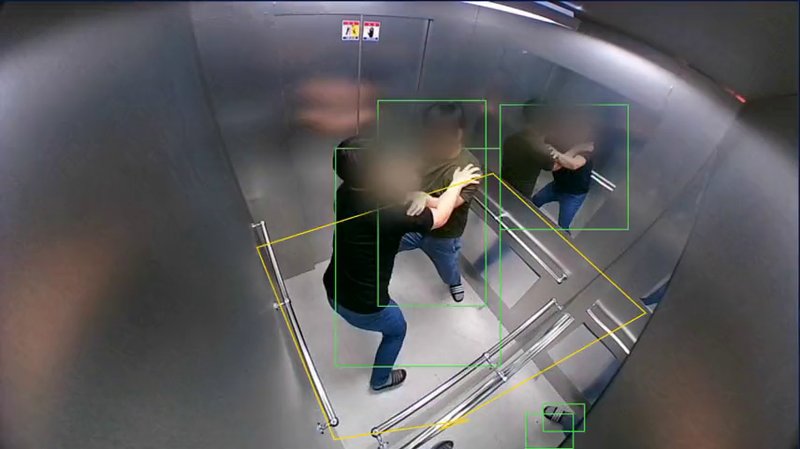
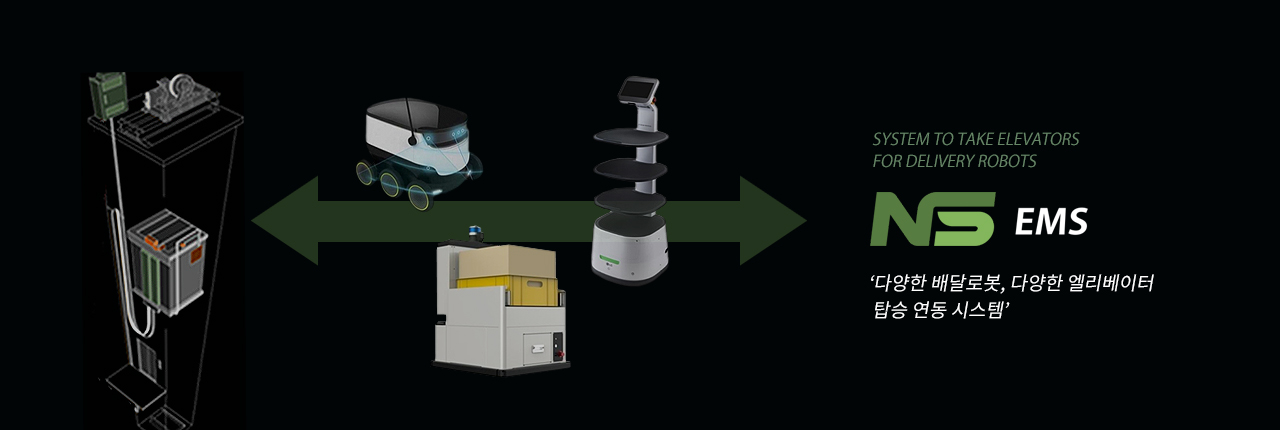
Elevator boarding for robots from leading makers — via monitoring panel or the RB-100 gateway.
Certified programmable electronic system for safety-related applications in escalator control panels.
Remote Call smartphone elevator calling, Bluetooth door and elevator calling, ONE-PASS destination registration, LCD information displays and AI-based safety devices such as door fault detection and escalator handrail warnings.
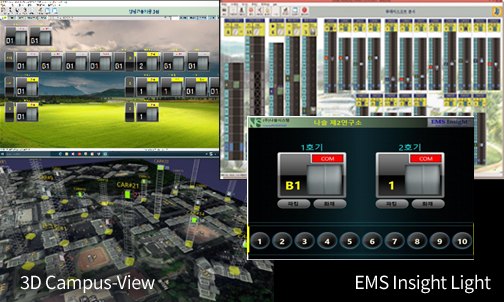
EMS Insight®
Elevator CRT monitoring panel
- Real-time elevator status management
- Fault info, maintenance and control history
- Remote control, reset, fault analysis, inspection
- No separate SRM board — shared with the CRT SRM
- No machine-room LTE routers with wired internet (lower cost)
- EMS Insight Light: low-cost version for small sites (lobby destination pre-registration)
- Connects to most Korean and overseas controllers — O, T, H, M, Samil ELTEC, Daesung IDS, SL&C, STEP, Monarch and more
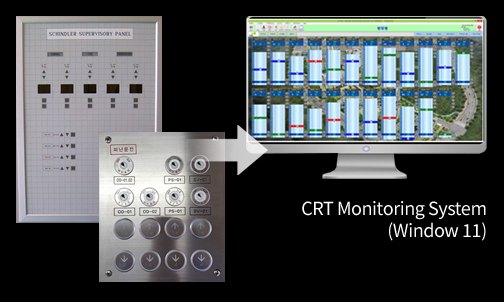
Replace legacy panels with the latest CRT
- Replace old panels at the lowest cost (Windows 11)
- Wireless panels with no extra wiring (remote reset) — factories, sports facilities, towers
- Integrate different manufacturers into one panel (legacy/special models after testing)
EMS Insight® V2
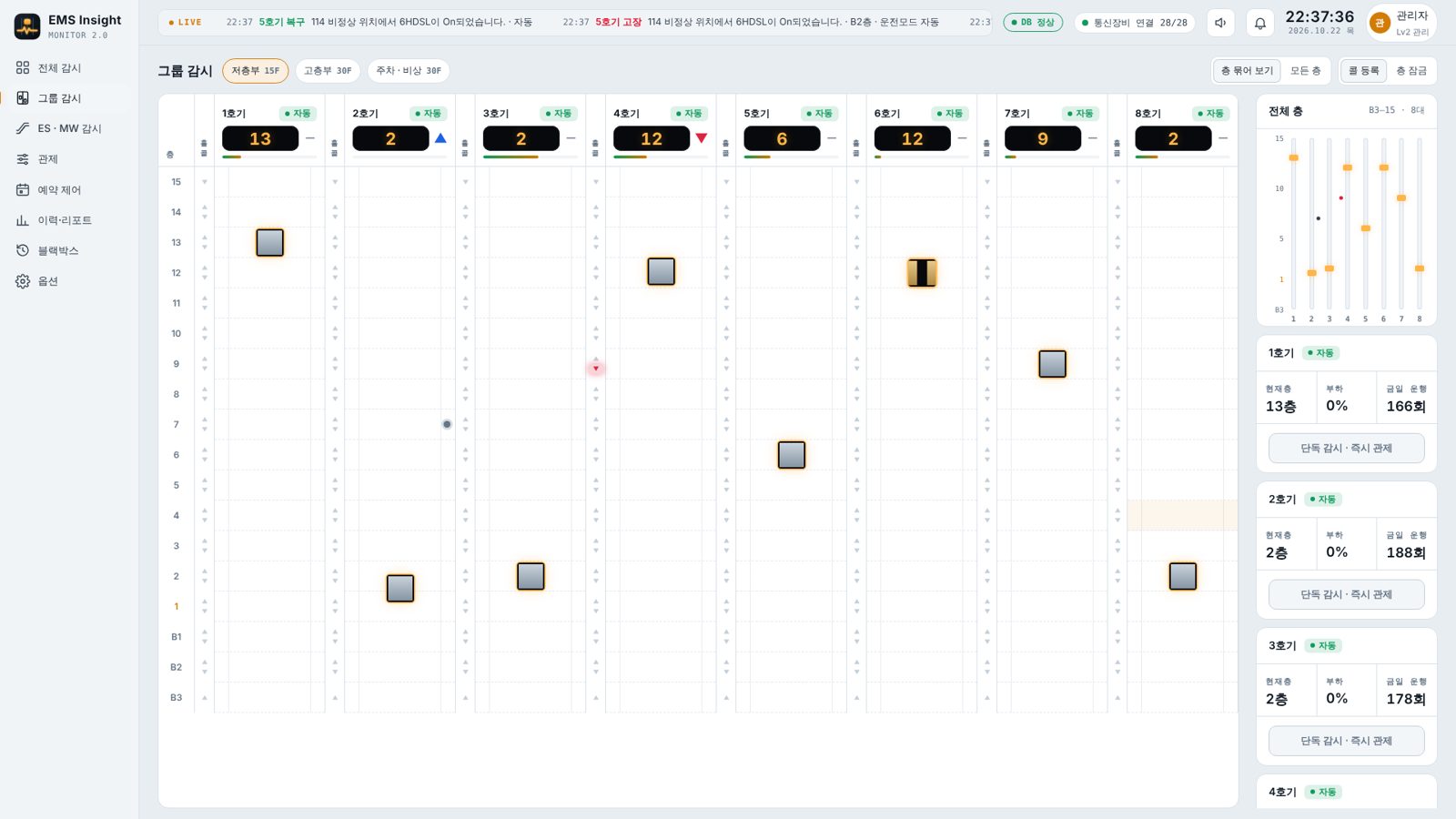
EMS Insight V2 monitors and controls a building’s elevators, escalators and moving walks from a single web browser. Any PC on the same network can connect — not just the control-room PC — and several people can watch at once. The server collects status, records faults and runs schedules, so records and schedules keep going even when every screen is closed.
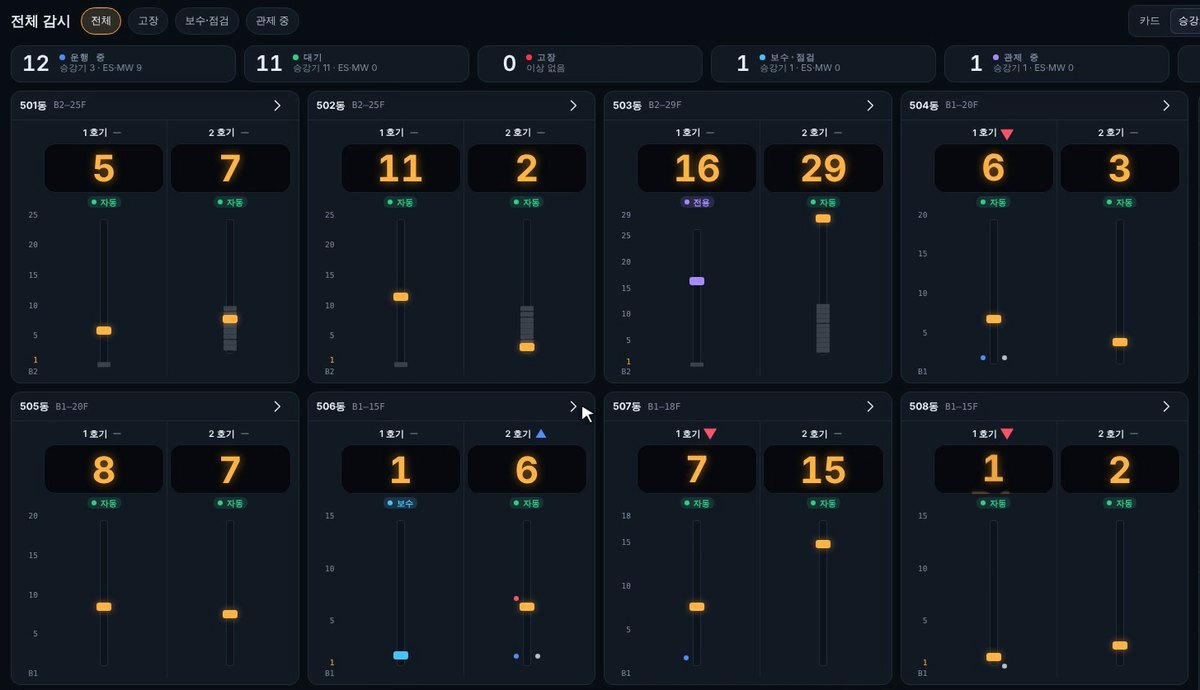
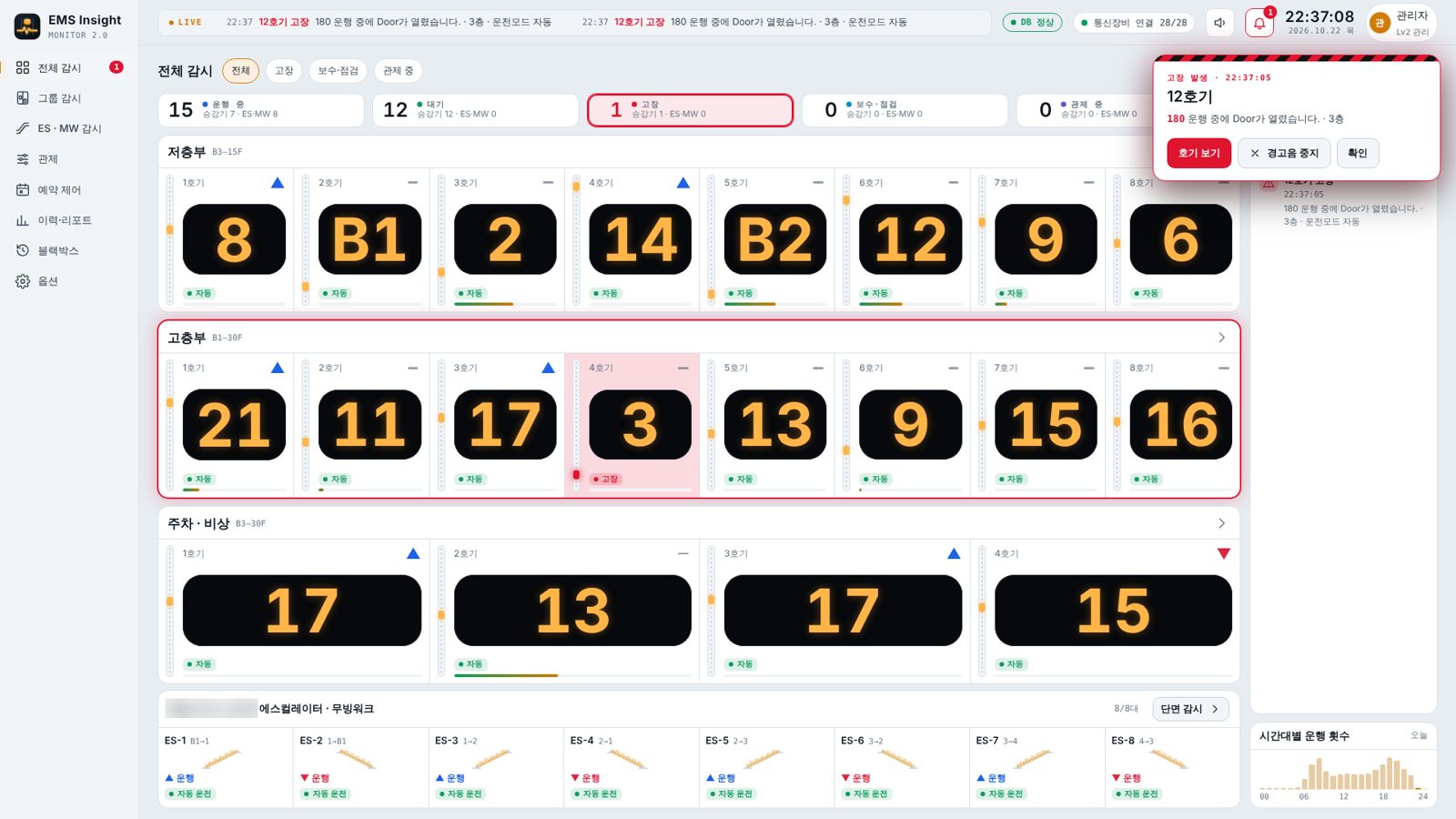
Overview screen — current floor, direction and operating mode per car, plus live events (site names and data are examples)
Everything at a glance
All equipment appears as cards by group, and you can drill down as far as you need.
- Overview — floor, direction, mode and load for every car on one screen; filter to faults, maintenance or control
- Group view — floor × car grid with car position, car calls and hall calls; register calls, lock floors
- ES·MW view — escalators and moving walks in floor cross-section, with direction, stop and fault
- Single-unit view — load, trip counts and signal status for one car, with direct control
Instant fault alerts, automatic records
When a unit reports a fault code, every monitoring screen is alerted at once.
- Fault box (car, fault code, description, stop floor) and alarm sound
- The group and car card turn red so you can locate it immediately
- Fault code, time, stop floor and elapsed time; remote reset depending on model and permission
- The server records every fault from occurrence to release
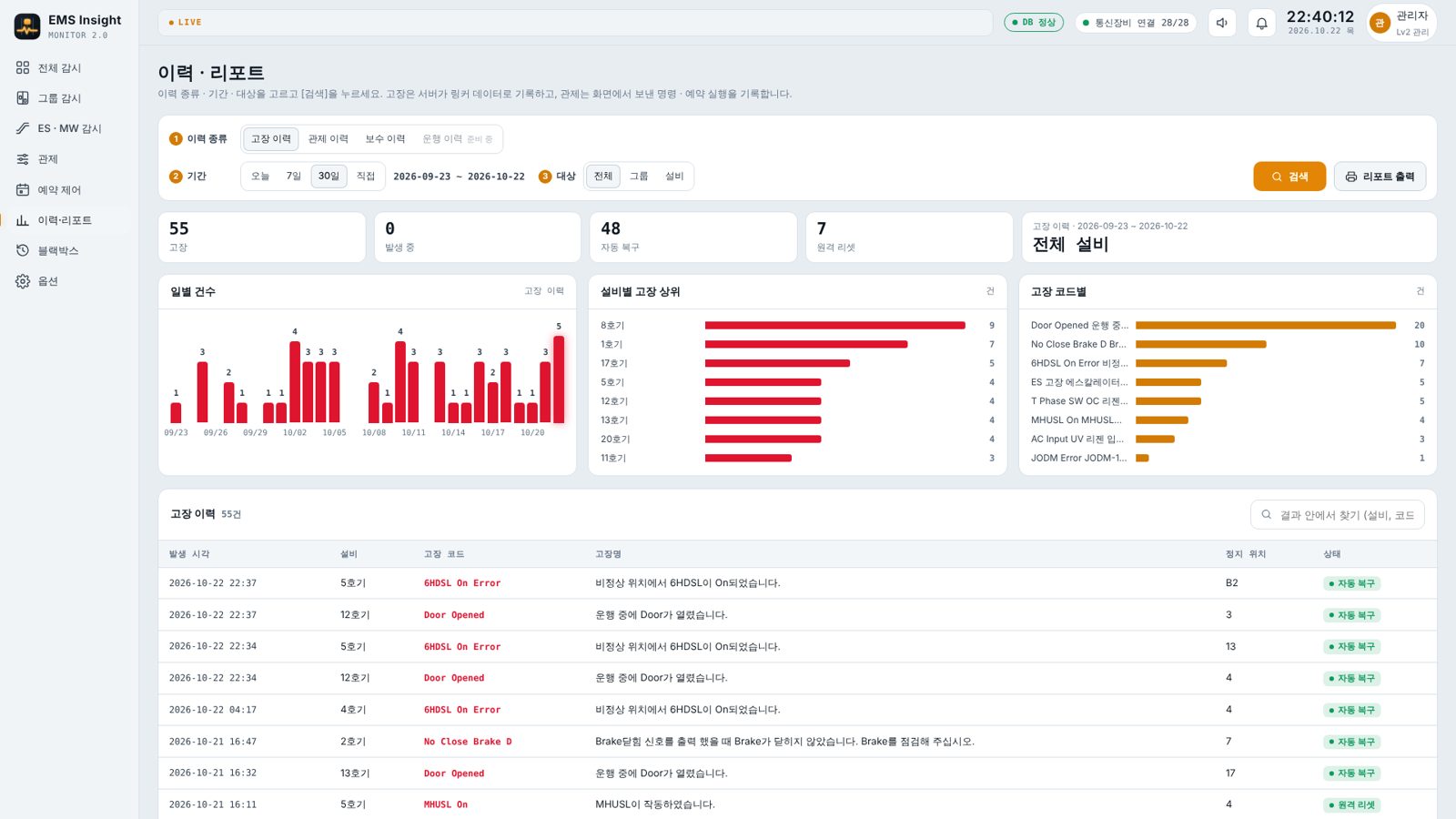
Control, scheduling and reports
Control many units at once and automate routine operation with schedules.
- Group control — parking, exclusive, independent, maintenance, fire control and more, for a group or many units at once
- Scheduling — runs automatically by weekday and time (night parking, weekend energy saving), holidays, 1-minute advance notice
- History & reports — search fault, control and maintenance history; stats by day, unit and fault code; print or PDF
EMS Insight 2.0 introduction
Promo (about 2 min) — per-user login, full overview, shaft view, instant fault alerts, single-car monitoring and instant control, group view, escalators and moving walks, control, floor control and floor lock, virtual car calls, scheduled control, history and reports, trip history, black-box playback, fault alerts via KakaoTalk (site names and data on screen are examples)
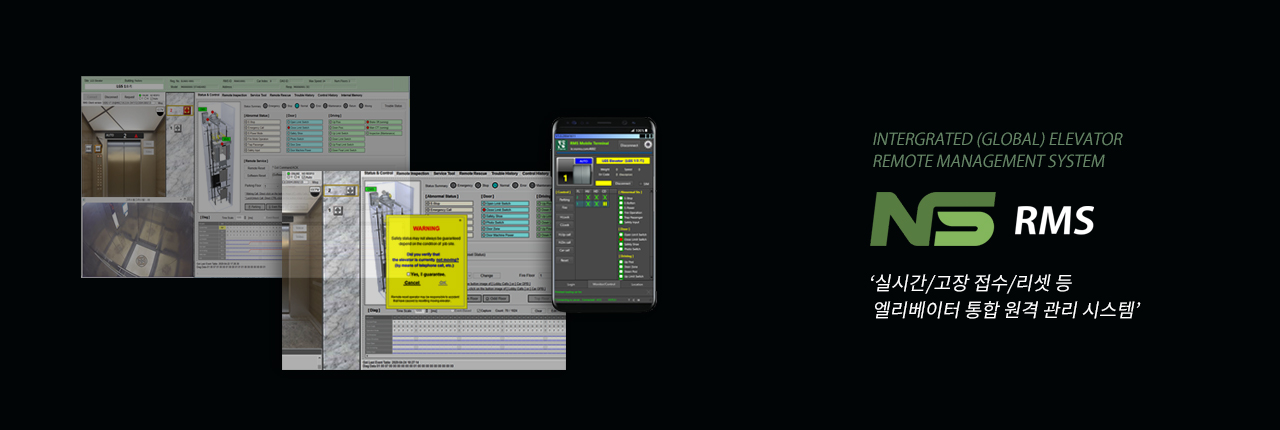
EMS Global-NSRMS Remote Monitoring System
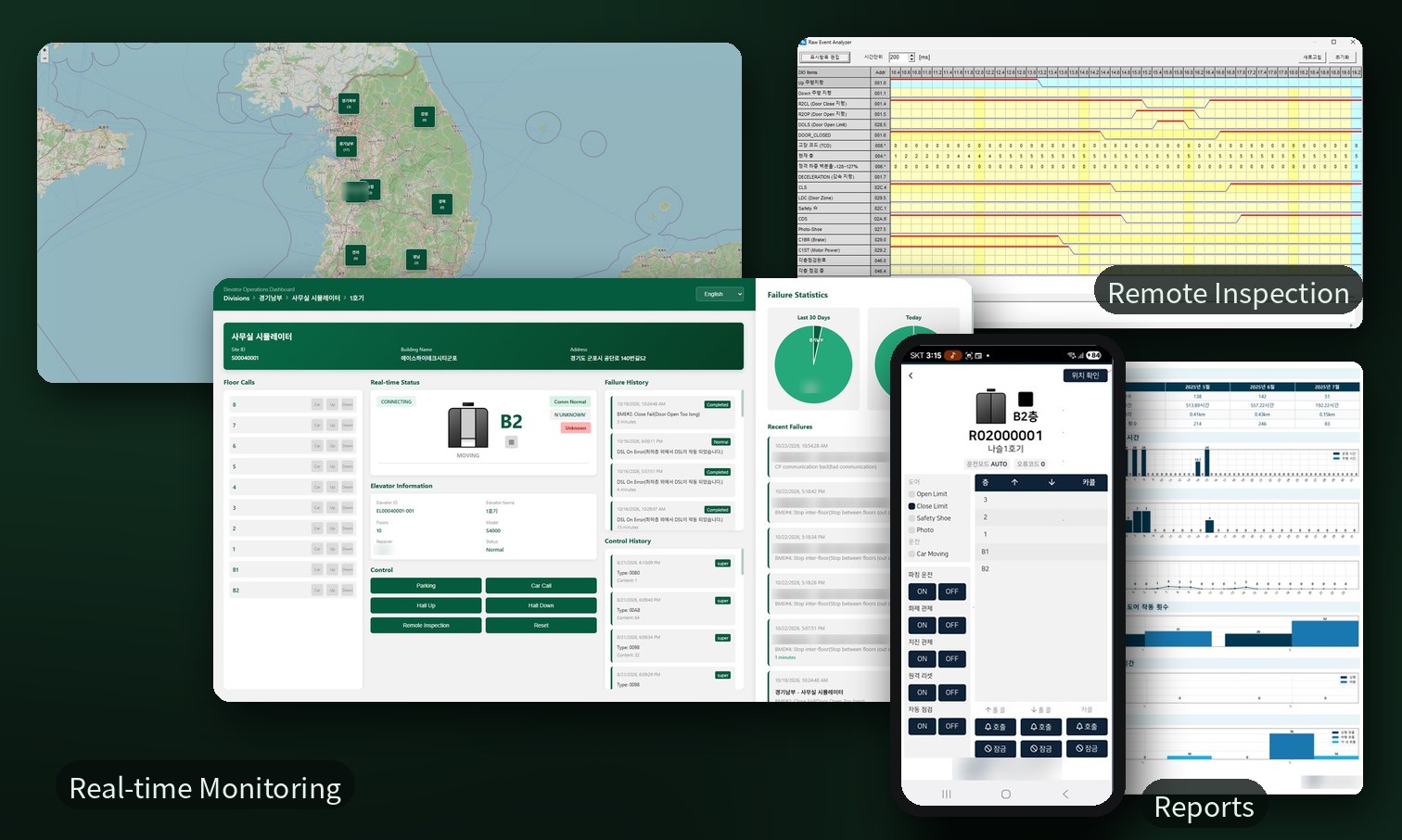
When a fault is reported, connect remotely to check the current status in real time.
- Remote monitoring, control/reset, alarms, history
- Remote inspection, weekly/monthly reports, noise & vibration analysis
- Component lifecycle management
- Fault analysis and inspector location tracking
Remote monitoring, anywhere
Beyond the monitoring-center software, you can check and control elevators from a web dashboard and a smartphone app. Data collected every month is compiled into remote-inspection and operation reports for building managers.
When a fault occurs, the right people know at once
When the SRM unit detects a fault, the monitoring center and the assigned maintenance technician are alerted at the same time for a fast response.
Central control-center dashboard
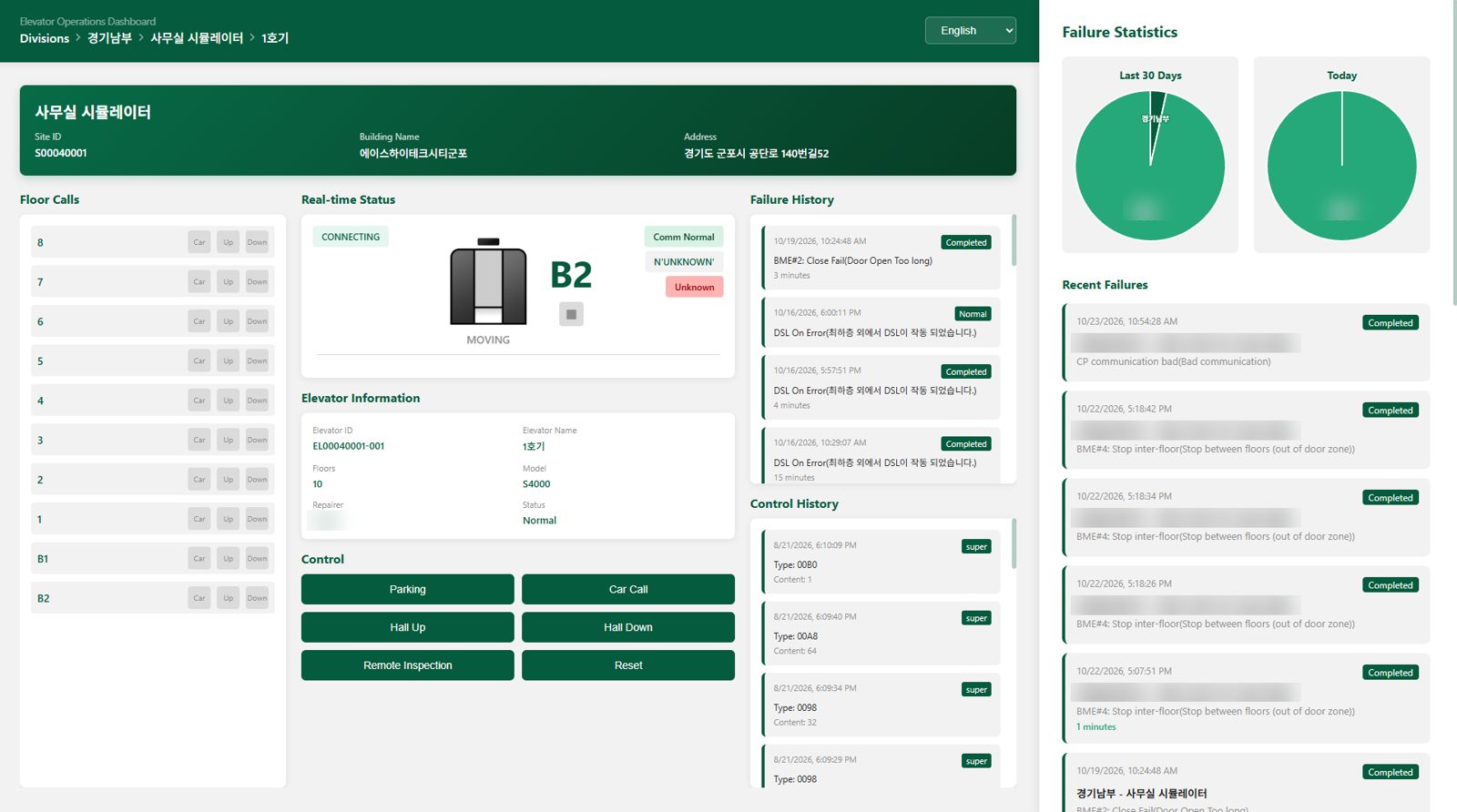
Put the nationwide site map and per-car monitoring side by side on large screens and run a central control center that oversees elevators across the country from one place.
- Large-screen operation — map and monitoring laid out horizontally on a video wall
- Nationwide site map — number of sites by region at a glance
- Real-time status per car — drill down division → site → car for calls, faults and control history
- Fault statistics — last 30 days and today, plus recent faults
- Remote control — parking, car call, hall call, remote inspection and reset
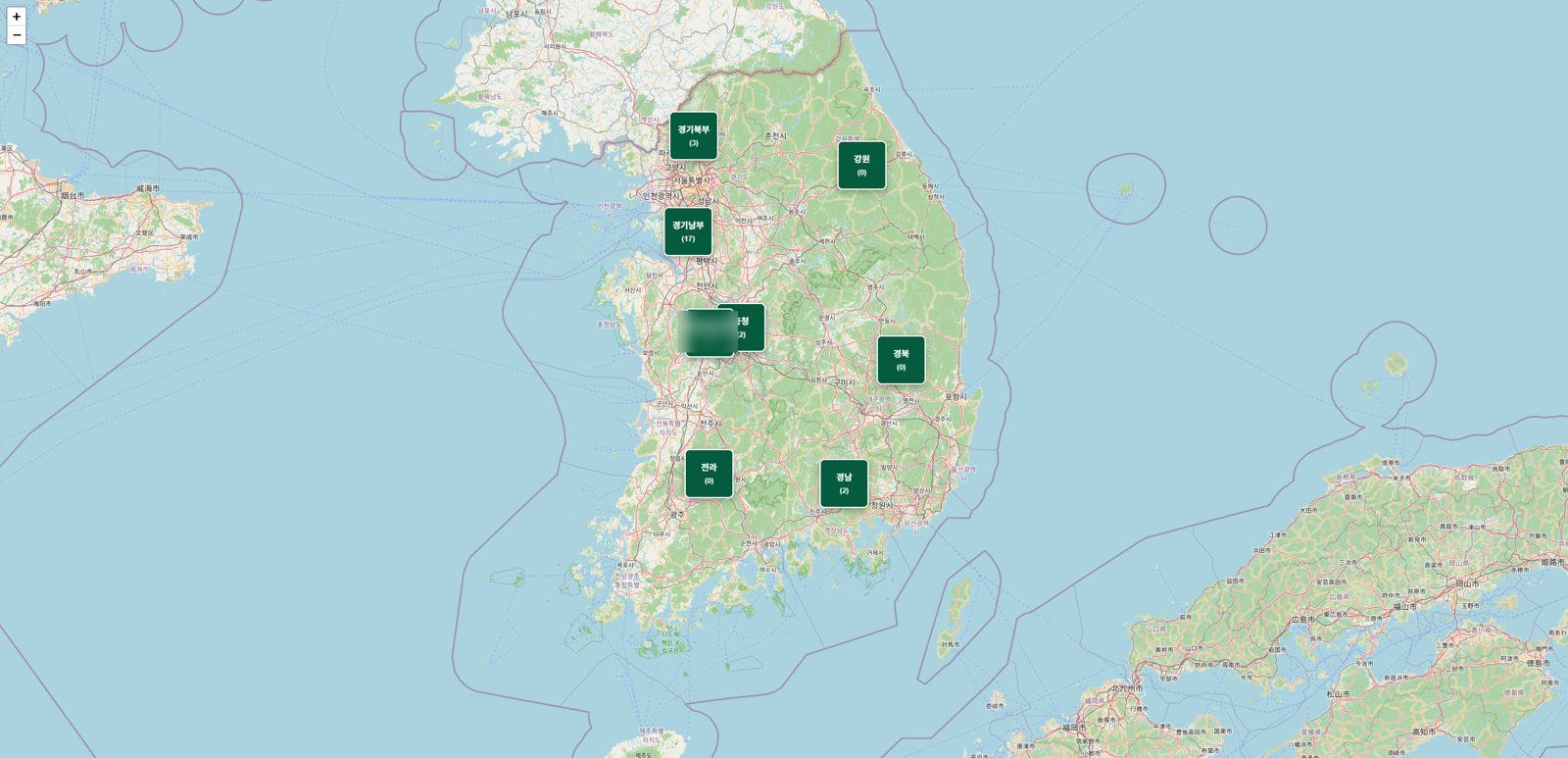
Large-screen layout example — nationwide site map (left) and per-car monitoring (right)
Mobile app
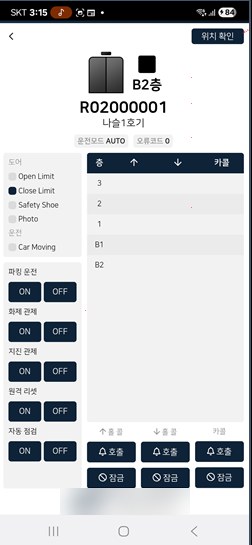
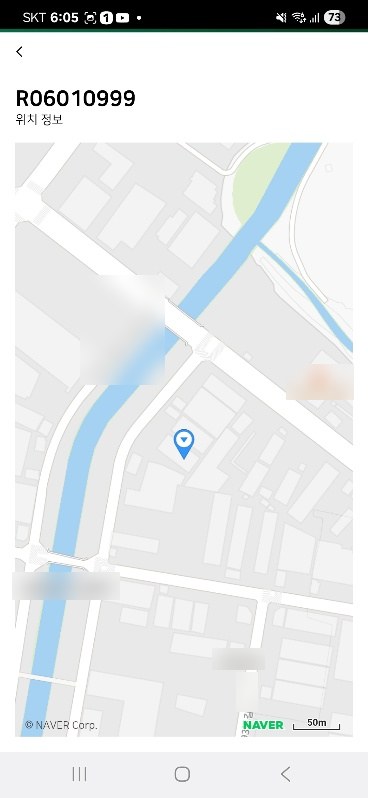
Field technicians and building managers can check elevator status and perform simple control on the move.
- Current floor, mode, door state and error code in real time
- Car and hall calls by floor; register calls, lock floors
- Parking, fire control, earthquake control, remote reset, auto inspection ON/OFF
- Site location on a map
- Push notification to the technician when a fault occurs
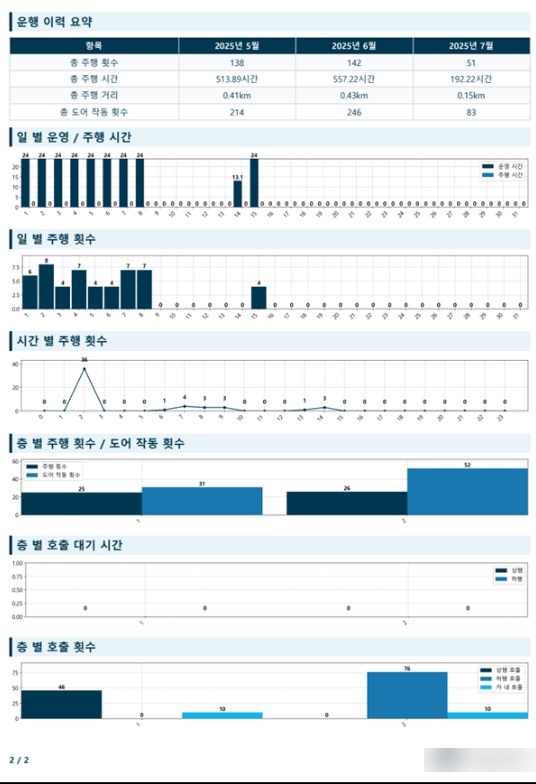
Remote inspection & monthly operation report
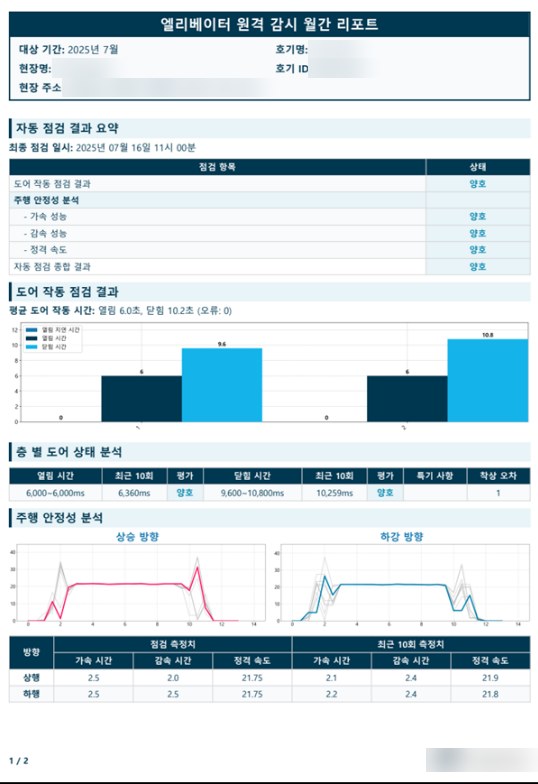
The SRM unit runs automatic inspections from collected data — no site visit needed — and the results and a month of operation statistics are compiled into a monthly report for building managers.
- Inspection results — door operation, acceleration, deceleration and rated speed
- Ride stability — latest speed profile compared with the previous 10 runs
- Operation statistics — trips, running time and distance for 3 months; daily and hourly trips
- By floor — trips, door operations, calls and call waiting time
- Customers view reports on the report web and download PDFs
※ Customer and site details in the screenshots are masked
Fault & preventive maintenance
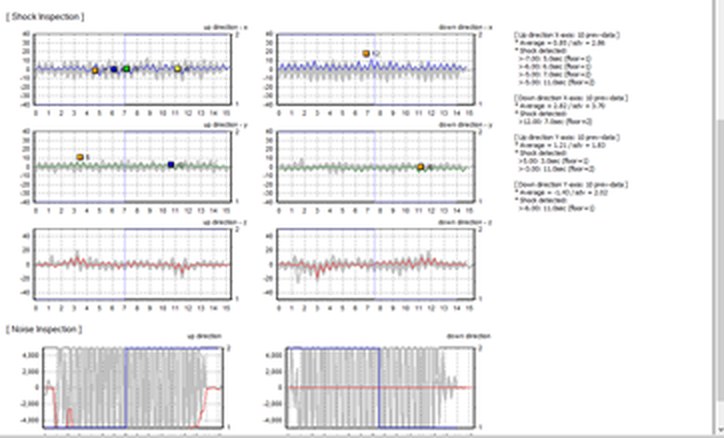
Example of shock and noise analysis from the remote inspection report
Failure prevention — noise & vibration analysis
Travel distance/count, door usage and efficiency reports, noise & vibration analysis (with MVS).
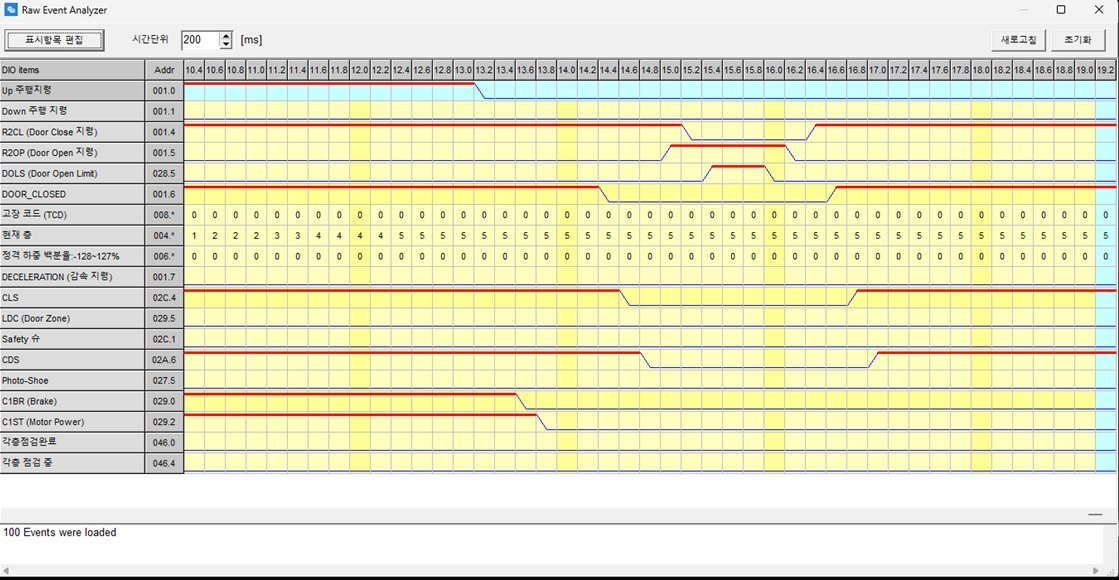
Example time chart of key signals at the moment of a fault
Fault cause analysis — time chart
On a fault, connect remotely to analyse the fault history and the I/O timing at the moment of failure. A time chart shows how key signals changed just before and after the fault, so the cause is known before anyone goes on site.
Component lifecycle
Aggregates component usage, issues regular reports and alerts at 80% and 100% thresholds.
Escalator PESSRAE certification
Programmable Electronic System for Safety-Related Application in Elevator/Escalator
PESSRAE verifies the safety of programmable electronic systems used in escalator control panels. NASEUL System has completed certification to IEC 61508, the international functional-safety standard.
CRT-LITE
A 7-inch touch panel that doubles as lobby indicator and monitoring panel for small buildings without a control room. Connects directly to most Korean controllers.
- 7-inchIPS multi-touch
- 4-waylandscape / portrait
- 40 floorscustom floor names
- RS-485 · CANWi-Fi 6 built in
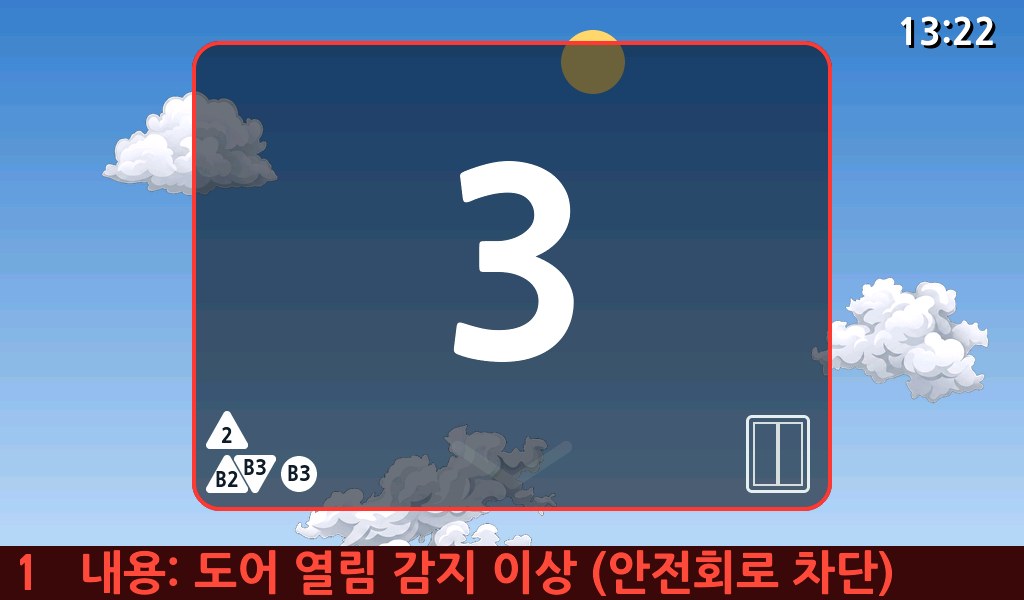
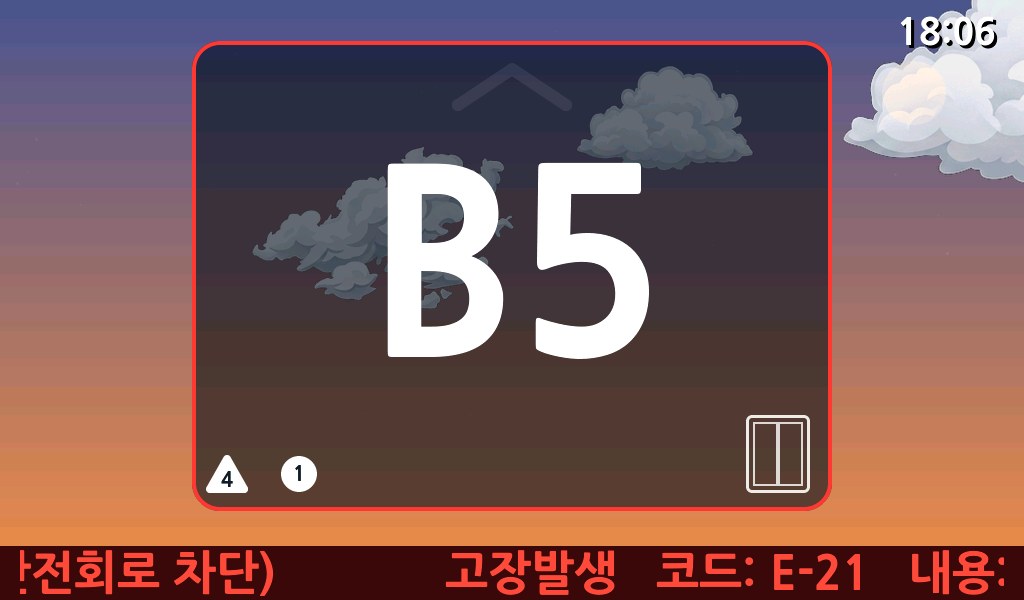
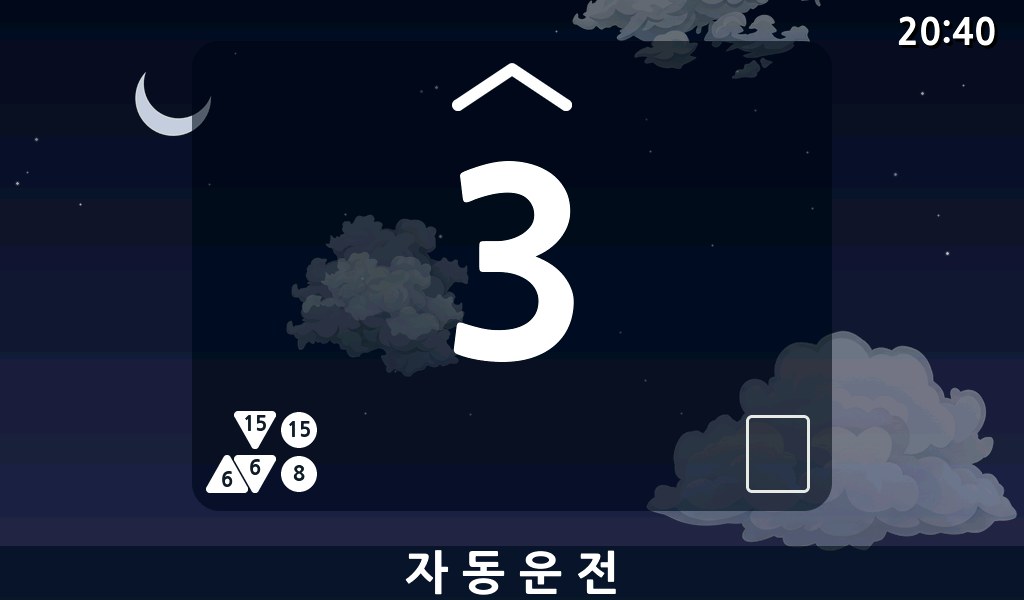
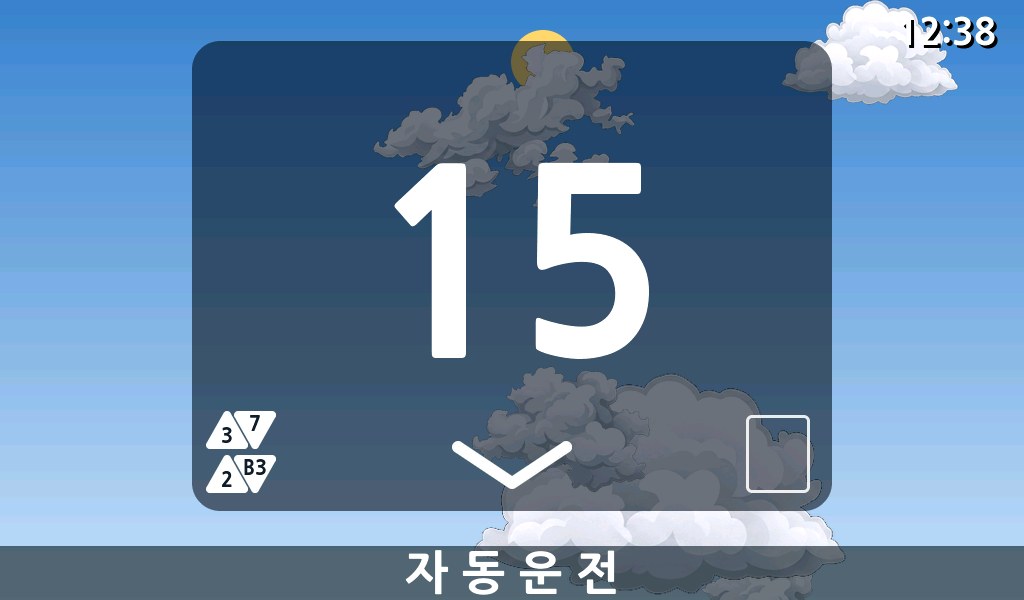
Large, legible floor display
Oversized numerals and rolling animation make floor and direction obvious from afar.
A living background
Day, sunset, night and dawn skies change with time; clouds drift with travel direction.
Alarms you won't miss
Fault codes and details on screen with an audible chime — mute with one touch.
Select the controller on screen
Protocols for most Korean controllers are built in — just change the setting on site.
Your brand, your logo
Boot logo and visible models are configured per customer for OEM supply.
Touch control & setup
Parking and fire control, home floor, floor lockout, 8 schedule slots. Optional remote server & app.
Specifications
- 7" IPS 1024×600 capacitive multi-touch, 4-way mounting
- RS-485 (per-model protocols), CAN, built-in Wi-Fi 6
- Monitors floor, direction, travel, door, calls, mode, faults
- Controls parking, fire, home floor, lockout, 8 schedules
- Up to 40 floors, car 0–63, optional remote server & app
NASEUL robot integration
is NELIOT
NELIOT is NASEUL System's elevator IoT platform. It exposes elevator data and control through APIs and apps — connecting robots, residents, managers and building systems.
Delivery, serving and cleaning robots ride elevators between floors. Two integration methods fit any site size and operating model.
What sets our robot integration apart
- Integrates with most elevators in Korea
- Experience from 500+ real monitoring-panel installations
- NASEUL standard interface, flexible to robot-server requirements
- Robots from different makers on one PC in the same building
- Elevators from different makers in one building, simultaneously
- Many elevators with many robots at once (N:N)
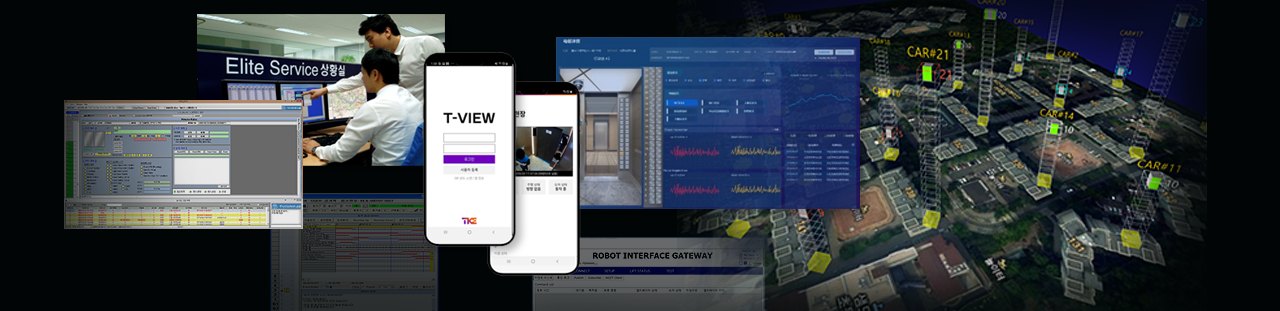
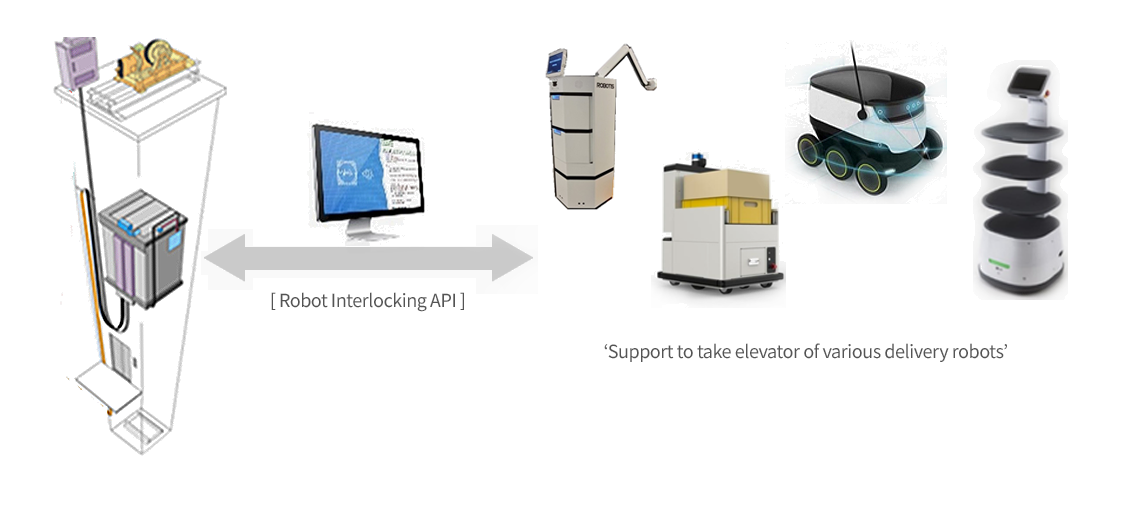
NELIOT robot integration system
A robot integration API lets a wide range of delivery robots board elevators.
Two ways to integrate
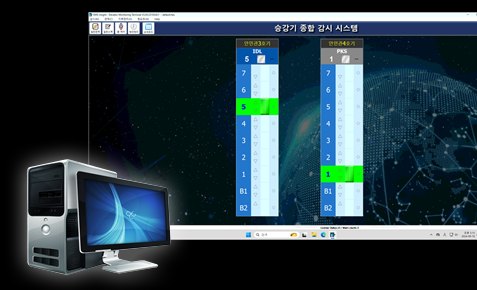
EMS Insight®
Our elevator monitoring-panel software — a PC-based system expandable to remote monitoring, building automation and robot integration.
Its robot extension talks to robot servers directly or via the NASEUL Robot Cloud. Large sites can be run from a single panel.
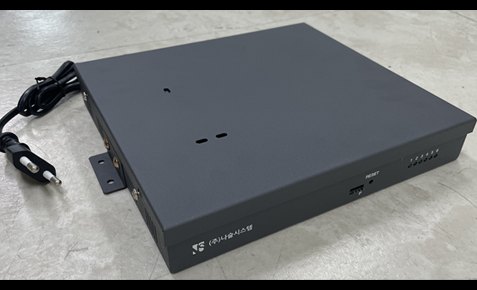
RB-100®
An IoT gateway that talks to elevators independently where there is no EMS Insight, collecting data and executing commands from servers and other devices.
Installed per controller or group where a panel is unwanted or impossible. Simple installation keeps costs down.
On-site install × server connection
Combine the on-site method with the server connection for four configurations.
| On-site method | Per-site connection (robot company manages sites) | NASEUL Robot Cloud (single server channel) |
|---|---|---|
| EMS Insight® | Panel features, best for large buildings | Panel features, large buildings, one standard interface |
| RB-100® | 1–2 cars, low-cost without a panel, per-robot-server work needed | 1–2 cars, low-cost, one standard interface |
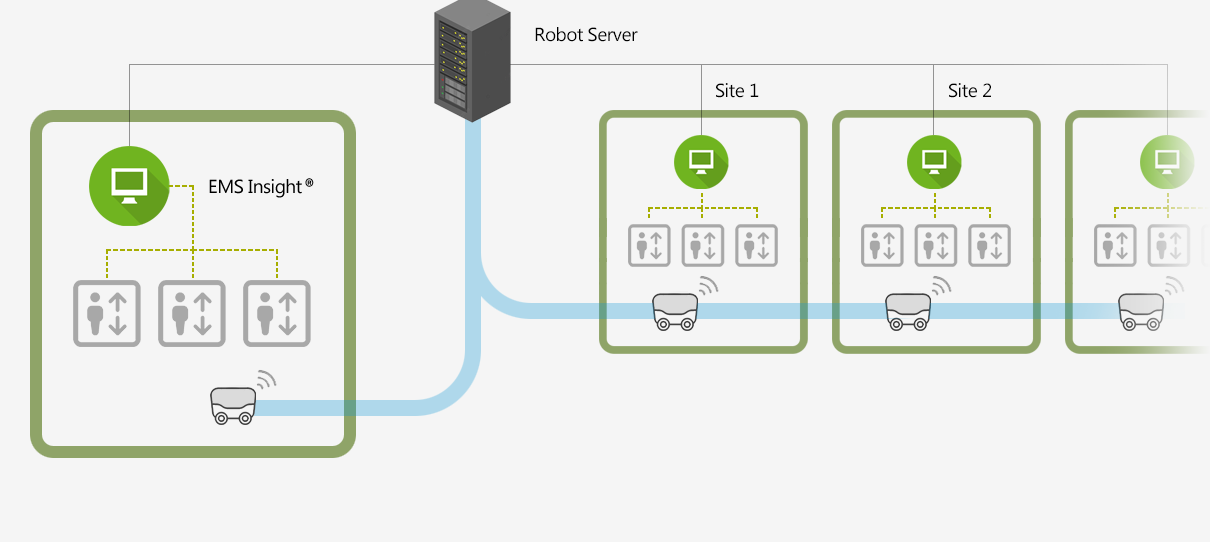
- A panel system on each site
- Robot server talks to every site's panel
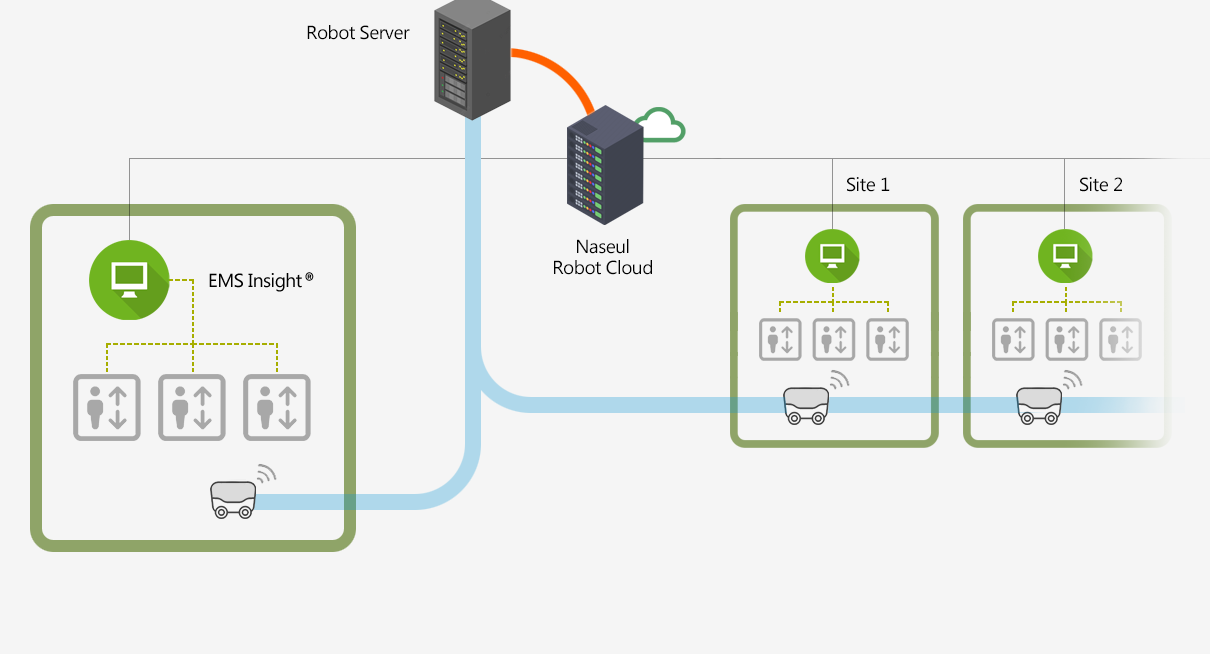
- A panel system on each site
- Robot server reaches all elevators through the NASEUL cloud
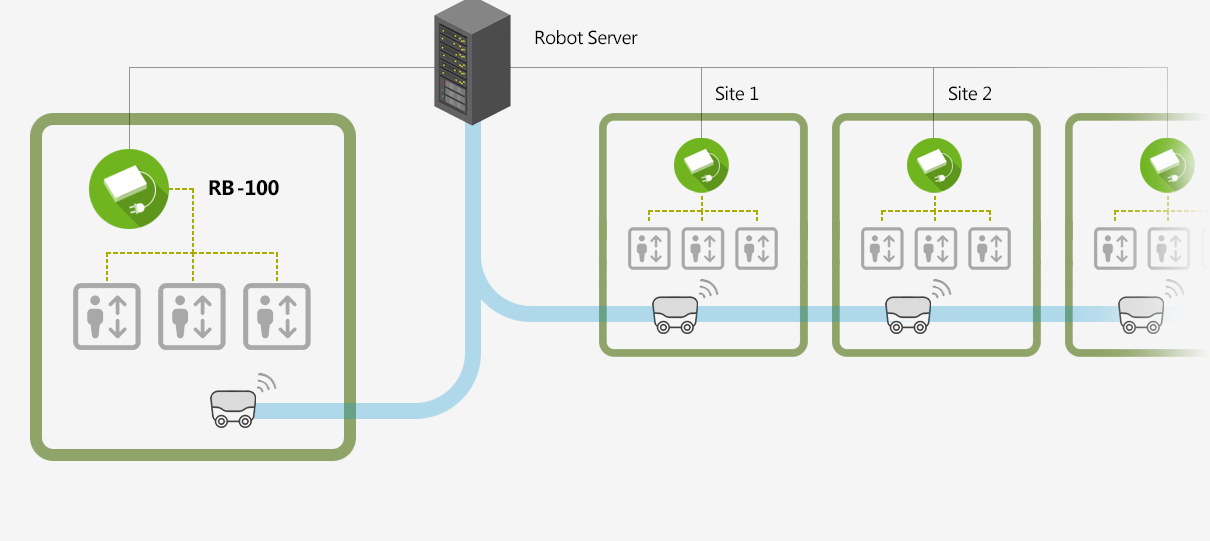
- RB-100 in the machine room where there is no panel
- Robot server talks to every site
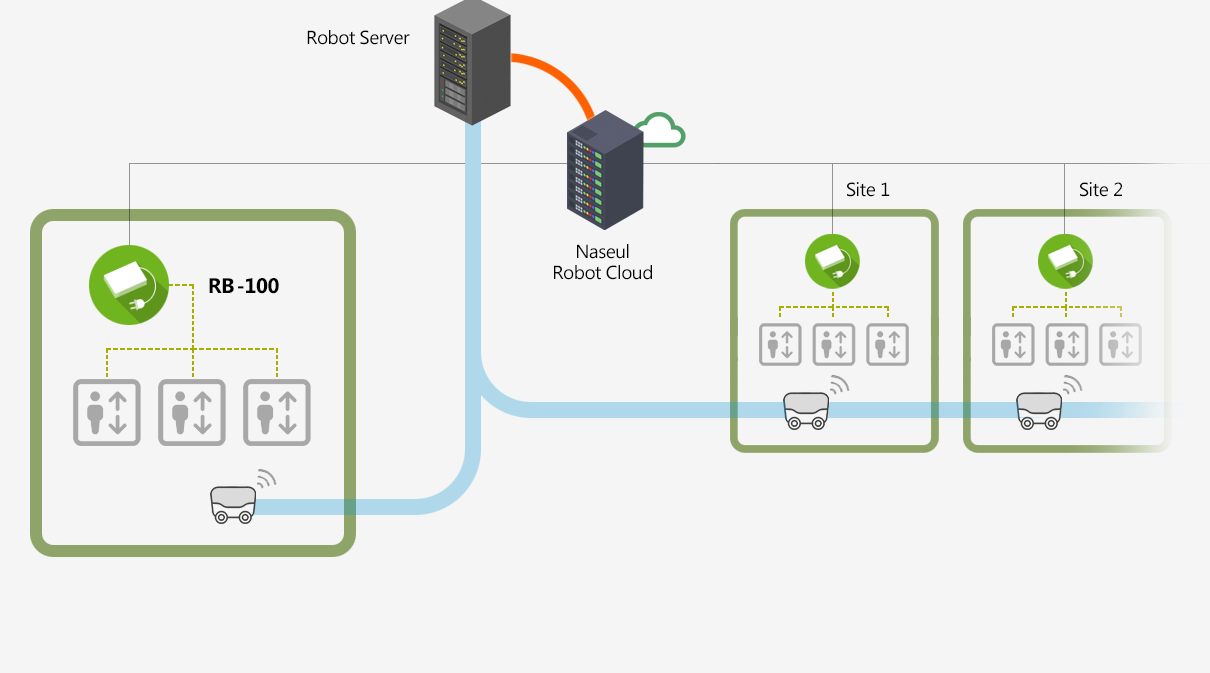
- RB-100 in the machine room
- Robot server controls via the NASEUL cloud
Three steps to configure
Check the controller type
- Most Korean controllers and some overseas models
- Some old models or sites may need prior review
- Any elevator can be connected if the client provides specs
Choose EMS Insight or RB-100
- Share site info and goals — we review the best fit
- Optional pre-test on our simulator server
- EMS Insight: one per site · RB-100: one per car
Decide the server connection
- NASEUL standard, common industrial standards, or the robot server's own
- Per-site connection or the NASEUL Robot Cloud
Remote Call — call the elevator from your smartphone
Call the elevator in advance from a smartphone app and follow its arrival in real time. Calls go through the server via the existing remote-monitoring unit or integrated monitoring panel, or directly on site over Bluetooth with the BTS-100 call device — no server required.
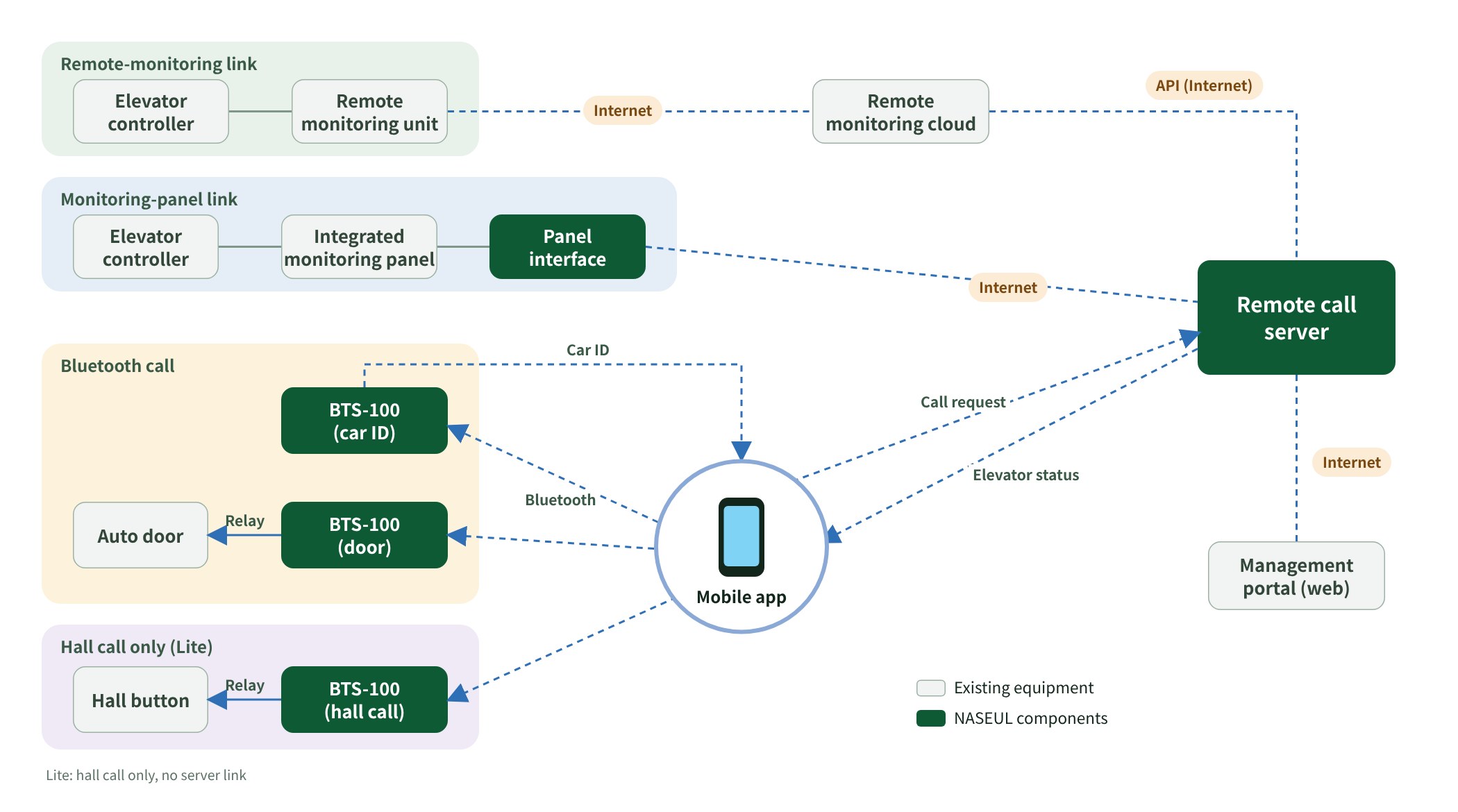
- Remote call from the app — Call the elevator to any floor via the internet (server) or Bluetooth
- Real-time status — See car position, travel direction and arrival in the app
- Arrival alerts — Push notification on arrival; quick calls from favorite floors and recent history
- Voice command — Request a call by voice (option)
- Management portal — User and elevator registration, admin remote control, web-based operation
- Equipment linkage — Relay link to auto doors and hall buttons; hall-call-only Lite configuration
- Security — ID/password and token authentication with per-user access control
One smartphone opens the security door and calls the elevator — BTS-100
Uses the Bluetooth function of the resident's smartphone. When a registered phone approaches the building entrance, the security door opens automatically, and the elevator is called before the resident reaches the hall — no key card, no button.
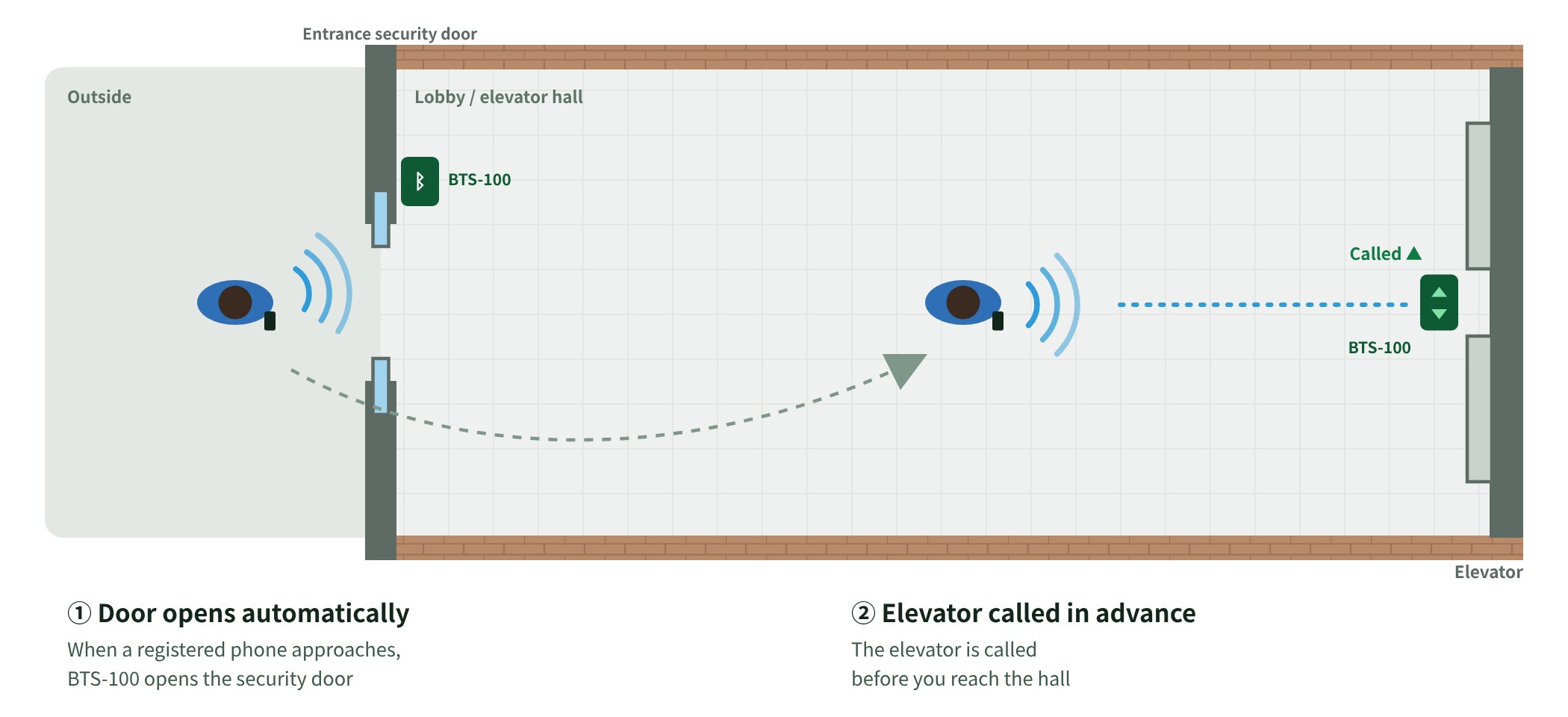
- BTS-100 broadcasts its ID over Bluetooth; the app detects the approach to a registered device and requests the call
- Relay output connects to the auto-door open contact or the elevator hall button — one device, two uses
- Works with any elevator make; can be installed per car
- No server or internet link required, so no communication fees
- Devices are registered simply with a QR code managed by the building office
- Once started, the app keeps running in the background
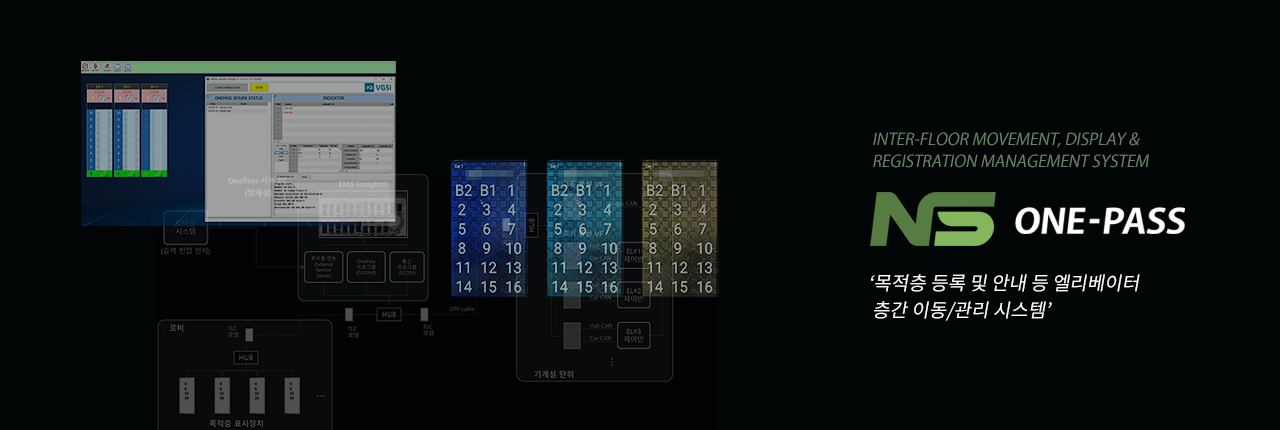
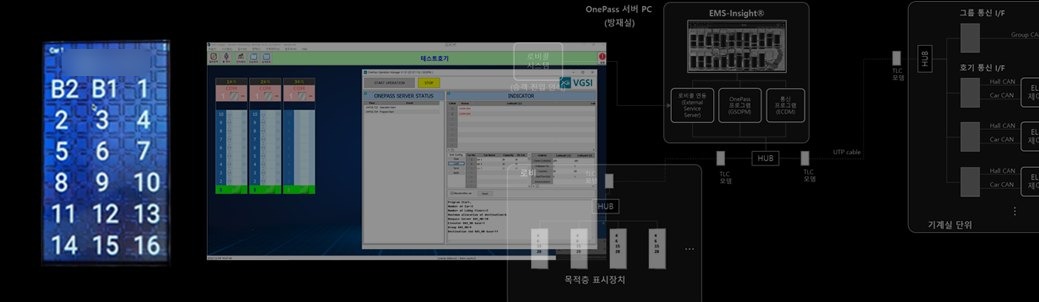
Destination registration & guidance — ONE-PASS
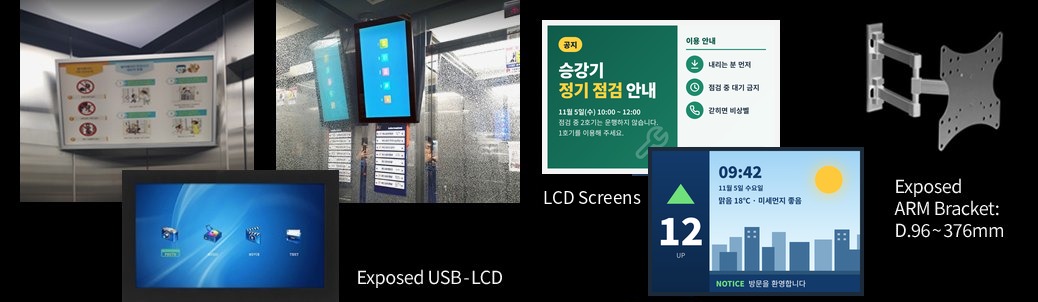
Elevator LCD information display (+USB)
AI-based elevator and escalator safety devices
AI analyses camera video to detect elevator door faults and risky behaviour on escalators. Full details are on the AI-based Products page.
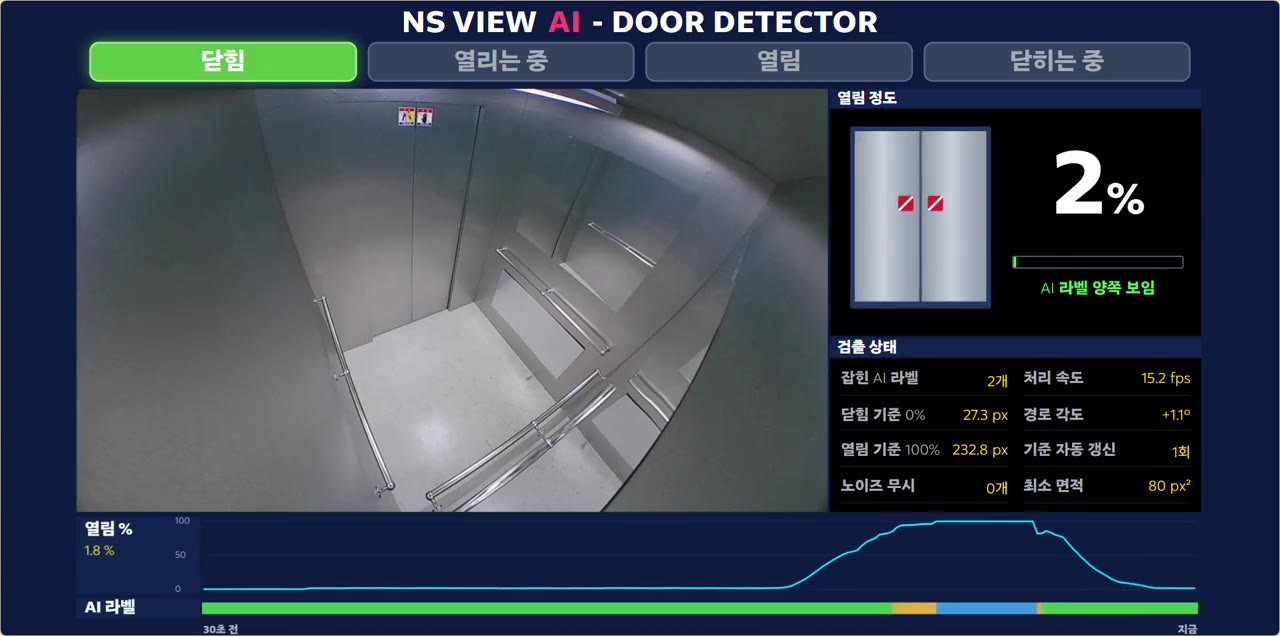
Door fault detection system
Analyses door movement (speed, obstruction) in the in-car video to detect door faults — about 80% of reported faults — without extra sensors, and alerts staff automatically.
See details in AI-based Products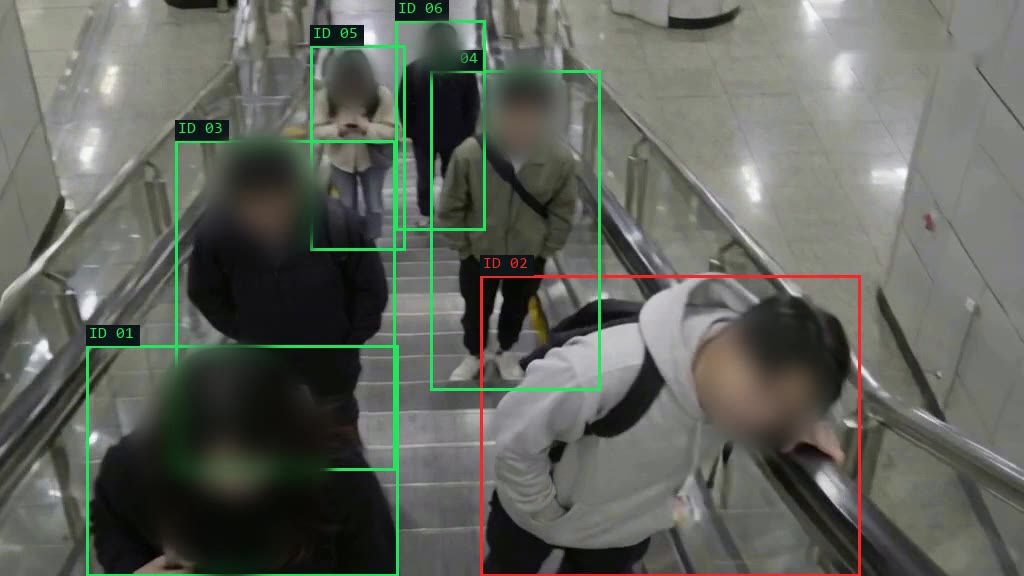
Escalator handrail approach warning
AI pose recognition warns when a passenger's head or shoulders lean too far beyond the handrail.
See details in AI-based ProductsTurning a closed market
into an open platform
The global elevator market is dominated by a few large brands, each running proprietary systems whose information is rarely disclosed.
With 20+ years across diverse operating systems, NASEUL bridges brands and models — going beyond fixes to online systems and services.
Multi-brand integration
Talks to most controllers: OTIS, TKE, Hyundai, Mitsubishi, Samil, Daesung IDS and more.
100% in-house software
All software developed in-house; hardware designed and assembled at HQ.
Fast service
Remote support within 4 hours, on-site within 2 days; 80% handled by our own staff.
Patents & certification
IEC 61508 certified; patents for elevator-robot interface and video monitoring.
Monitoring, safety, integration —
not sure where to start?
Tell us about your equipment and site, and we will propose the best-fit solution.